



























Connected care, registration to discharge.
One connected system for hospitals and nursing homes. Run OPD and IPD, billing, pharmacy, lab and insurance claims together, so doctors spend less time on paperwork and patients wait less.
- OPD & IPD
- Pharmacy & lab
- Insurance billing

Why Medivra.
Most hospitals and nursing homes run on separate registers, billing software and pharmacy systems that do not talk to each other. Patients repeat their details at every counter, bills miss charges, and insurance files go back for corrections.
Medivra puts OPD, IPD, billing, pharmacy, lab and insurance claims in one secure system. A patient is registered once, and every visit, test, medicine and charge follows them to the final bill. Doctors see the full record in one place, so they spend less time on paperwork and patients wait less.
Who it's for

Multi-speciality hospitals
Hospitals that need OPD, wards, OT, pharmacy and lab working from one patient record.

Nursing homes
Smaller inpatient setups that want admissions, room charges and discharge billing without a large IT team.

Maternity and surgical centres
Centres with planned admissions, package billing and a steady flow of insurance and cashless cases.

Hospital groups
Owners with more than one hospital who want consolidated revenue, occupancy and collection reports.
Everything inside Medivra.
Every module shares the same records, so a change made in one place shows up everywhere straight away.

Patient registration
Register a patient once with a unique ID, contact details and ID proof. The same record is used across OPD, IPD, pharmacy and lab.

OPD management
Manage doctor schedules, tokens and consultations. Doctors record complaints, diagnosis and prescriptions against the patient record.

IPD and wards
Handle admissions, bed and room allocation, transfers and nursing notes. Room and service charges are added to the patient account as they happen.

Billing and discharge
Build the bill from consultations, procedures, packages, medicines and tests. Collect advances and print a clear discharge bill and summary.

Insurance and TPA
Track pre-authorisation, approved amounts and claim status for insurance and TPA patients. Keep claim documents with the patient record.

Pharmacy
Issue medicines to OPD and IPD patients with batch and expiry tracking. Ward issues are charged to the patient account automatically.

Laboratory
Raise test orders from OPD or wards, track samples and enter results. Reports are available to the doctor on the patient record.

Owner dashboard
See daily collections, occupancy, doctor-wise revenue and pending claims. Compare branches in one consolidated view.
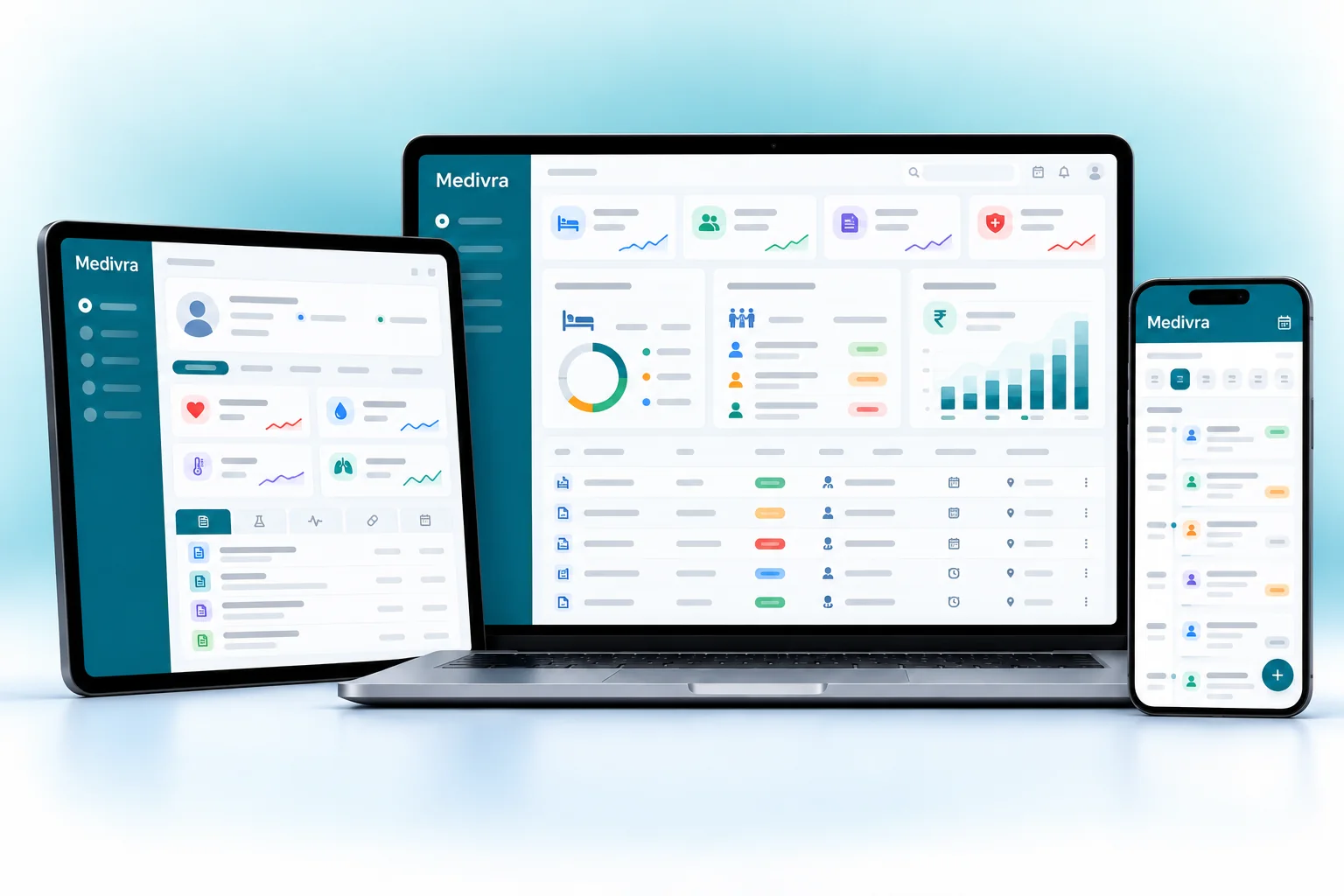
Medivra on every screen you use.
Desktop at the counter, tablet on the floor, phone in your pocket. The same data, updated as it happens.
How work moves through Medivra.
Each step hands over to the next automatically, so nothing is typed twice.
 1
1Register and consult
The patient is registered at the front desk, gets a token and sees the doctor, who records notes and orders tests or medicines.
 2
2Admit and treat
If admission is needed, a bed is allocated. Nursing notes, procedures, medicines and tests are charged to the patient account through the stay.
 3
3Claim and bill
For insured patients, pre-authorisation and claim status are tracked. At discharge, the final bill is built from every recorded charge.
 4
4Discharge and review
The patient leaves with a discharge summary and bill. The owner reviews collections, occupancy and pending claims for the day.
The right screens for every person.
Each person signs in with their own login and sees only what their job needs. Every change is recorded in the audit trail.

Owner
Sees daily collections, occupancy, doctor-wise revenue and pending claims, compares branches, and controls who can see which patient records.

Doctor
Sees own OPD schedule and patient records, records complaints, diagnosis and prescriptions, and views lab reports. Does not handle billing.

Front desk
Registers patients, issues OPD tokens, handles admissions and bed allocation, collects advances and prints discharge bills.

Pharmacy and lab
Pharmacists issue medicines by batch and expiry to OPD and wards. Lab staff track samples and enter results for the doctor.
Built for the way healthcare works.
We set Medivra up with your items, prices, taxes and formats, move your existing data across and train your team before you go live.
Works with
- Barcode scanners and label printers
- UPI QR and card terminals
- SMS and WhatsApp messages
- Tally export (Excel/XML)
- Lab analysers (where supported)
- ABDM connection through your registration
- Thermal and A4 printers
 One patient ID across OPD, IPD, pharmacy and lab
 Doctor schedules, tokens and consultation notes
 Bed allocation, transfers and room charges
 Package and itemised billing with advances
 Insurance, TPA and cashless claim tracking
 Ward pharmacy issues charged to the patient
 Lab orders and results on the patient record
 Daily collection and occupancy reports
Rules followed. Data protected.
Medivra keeps the records your regulators and auditors ask for, and every release is penetration-tested by our own security team before it reaches you.
Indian regulations
3ABHA and ABDM
Helps you record a patient's ABHA number and is designed to work with ABDM health record sharing where your setup supports it.
NABH documentation
Keeps the patient records, consent notes, discharge summaries and audit trails that NABH assessors usually ask to see.
GST on hospital billing
Applies the correct GST treatment to taxable items such as certain room rents and pharmacy sales, with HSN/SAC codes on invoices.
Built-in controls
3Patient data privacy
Role-based access means staff see only the records their job needs, which supports your duties under India's data protection law.
Audit trails
Every change to bills, records and discounts is logged with the user and time, so you can trace who did what.
Security testing
Every release is penetration-tested by our in-house security team, and data is encrypted and backed up regularly.
Questions about Medivra, answered.
Straight answers to what owners usually ask before switching to Medivra.

Still have a question?
Talk to someone who knows Medivra, or see it working with your own data.
hello@hexasecurelabs.com01Can we use only OPD and billing first?
Yes. Many hospitals start with registration, OPD and billing, then add IPD, pharmacy and lab once staff are comfortable. The patient record stays the same throughout.
02Does Medivra handle insurance and TPA cases?
Yes. You can record the insurer or TPA, track pre-authorisation and approved amounts, and see which claims are pending or settled.
03Can doctors see lab reports and past visits?
Yes. Each patient's consultations, prescriptions, test results and admissions are in one record that authorised doctors can open.
04Can we move our existing patient data?
Yes. Data migration from spreadsheets or your old software is part of onboarding. We review the data with you before go-live.
05Is patient data safe?
Access is role-based, every change is logged, and data is encrypted and backed up regularly. Each release is penetration-tested by our security team.
More for Healthcare



See Medivra with your own data.
Book a free, no-obligation demo. Tell us about your business and we'll show you exactly how the right application fits.