




























Your whole school, in one place.
Run a school from one place. Handle admissions, fee collection, attendance, exams and report cards, and keep parents informed through an app they will actually use.
- Admissions & fees
- Exams & report cards
- Parent app

Why Campusly.
Schools run on registers, receipt books and WhatsApp groups. Fee dues are hard to track, report cards take weeks to compile, and parents call the office for every small update.
Campusly brings the school onto one system. You handle admissions, fee collection, attendance, exams and report cards in one place, and the office stops re-entering the same details. Parents get attendance, fee reminders, homework and results in an app they will actually use, so the office phone rings less.
Who it's for

K-12 schools
You run classes from pre-primary to senior secondary and want admissions, fees and exams in one system.

School groups and trusts
You manage several campuses and want one view of fees, strength and results across them.

Principals and office staff
You want report cards, certificates and fee receipts without manual work and late nights.

Parents and guardians
They want to see attendance, homework, fees and results on their phone without calling the school.
Everything inside Campusly.
Every module shares the same records, so a change made in one place shows up everywhere straight away.

Admissions desk
Take enquiries and applications online or at the desk, track each one to admission and build the student record from it.

Fee management
Set fee heads, instalments, concessions and late fees by class. Collect at the counter or online and issue receipts instantly.

Daily attendance
Teachers mark daily or period-wise attendance on a phone or tablet. Parents of absent students are informed the same day.

Exams and report cards
Set up exams, grading and marks entry by subject. Generate report cards in your board's format, ready to print.

Timetable and homework
Build class timetables, assign substitutions and post homework and circulars that reach parents directly.

Parent app
Parents see attendance, fees due, homework, notices and results, and pay fees through your payment gateway.

Staff and payroll
Keep teacher and staff records, subjects and classes, with attendance and leave linked to Staffora payroll if you use it.

Certificates and records
Issue transfer, bonafide and character certificates from student records, and keep data ready for UDISE+ returns.
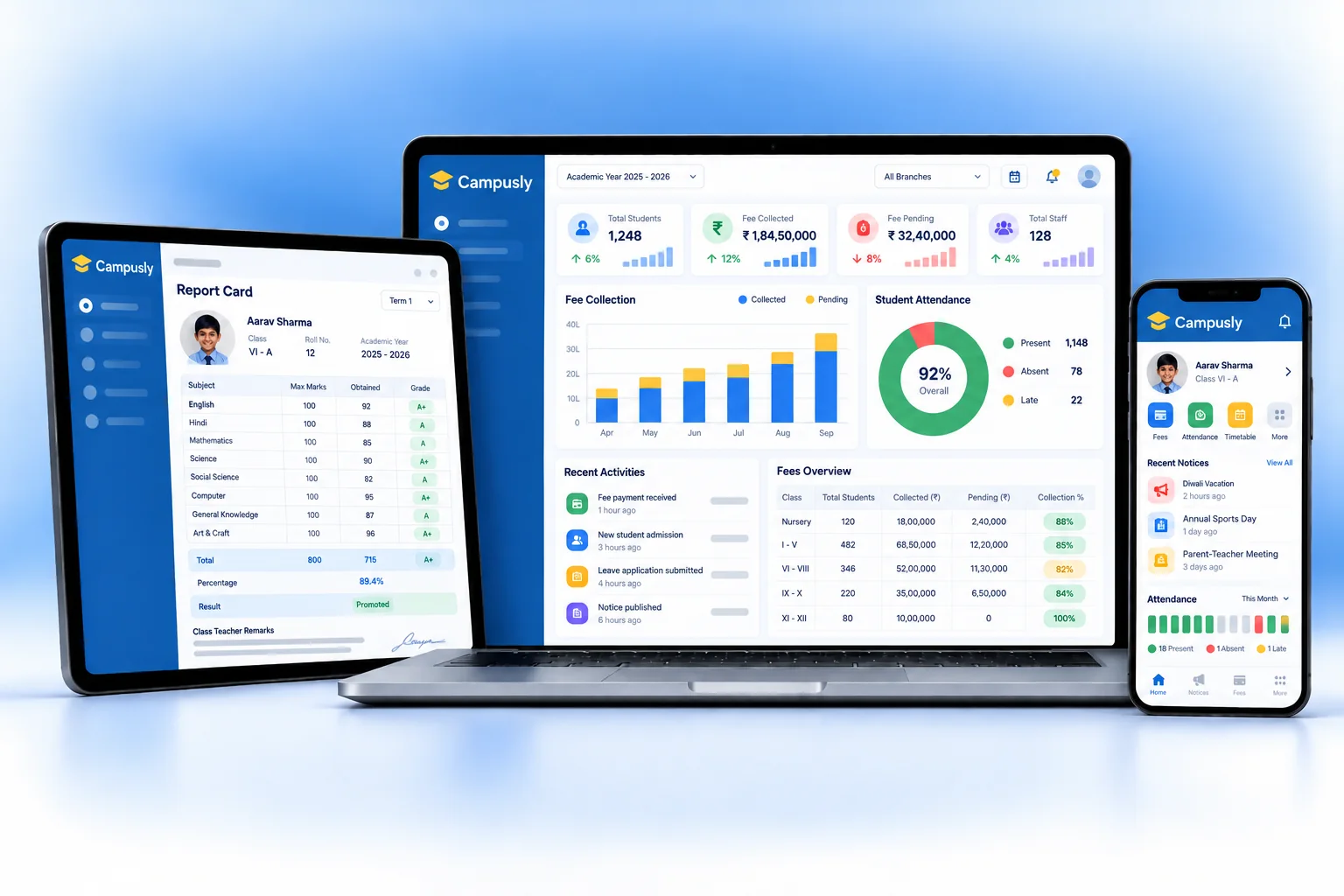
Campusly on every screen you use.
Desktop at the counter, tablet on the floor, phone in your pocket. The same data, updated as it happens.
How work moves through Campusly.
Each step hands over to the next automatically, so nothing is typed twice.
 1
1Morning attendance
Teachers mark attendance in class. Parents of absent students get a message within minutes.
 2
2Teaching day
Timetables run, homework and circulars are posted, and parents see them in the app the same day.
 3
3Fee collection
The office collects fees at the counter or online. Defaulters get reminders and the owner sees daily collection.
 4
4Exams and results
Teachers enter marks, Campusly builds report cards and parents see results in the app.
The right screens for every person.
Each person signs in with their own login and sees only what their job needs. Every change is recorded in the audit trail.

Principal
Sees admissions, fee collection, attendance and results across classes, approves concessions and controls who sees student data.

Accounts staff
Collects fees at the counter or online, applies instalments, concessions and late fees, and issues receipts.

Teacher
Marks attendance, enters marks for own subjects, posts homework and sees own classes only. Cannot see fee records.

Parent
Uses the parent app to see attendance, fees due, homework, notices and results, and pays fees online.
Built for the way education & services works.
We set Campusly up with your items, prices, taxes and formats, move your existing data across and train your team before you go live.
Works with
- Online fee payment through your gateway
- UPI QR and card terminals at the counter
- SMS and WhatsApp messages to parents
- Biometric or RFID attendance devices
- Staffora for staff payroll
- Tally export (Excel/XML)
- Excel import and export
 Admissions from enquiry to enrolment
 Fee instalments, concessions and late fees
 Online fee payment for parents
 Daily absence alerts to parents
 Report cards in your board's format
 Homework, circulars and notices
 Parent app for every family
 TC and bonafide certificates in a click
Rules followed. Data protected.
Campusly keeps the records your regulators and auditors ask for, and every release is penetration-tested by our own security team before it reaches you.
Indian regulations
4UDISE+ data
Keeps student, teacher and infrastructure data organised so your annual UDISE+ return is quicker to complete.
RTE admissions
Mark students admitted under the RTE quota and track their concessions and reimbursement claims separately.
Children's data
Student data needs care under the Digital Personal Data Protection Act. Campusly records parent consent and limits access by role.
Board formats
Report cards and marks registers follow the grading pattern of your board, such as CBSE, ICSE or your state board.
Built-in controls
2Fee receipts and records
Every fee collected gets a numbered receipt, and every concession or refund is logged with who approved it.
Security-tested releases
Every release is penetration-tested in-house, and school data is encrypted and backed up regularly.
Questions about Campusly, answered.
Straight answers to what owners usually ask before switching to Campusly.

Still have a question?
Talk to someone who knows Campusly, or see it working with your own data.
hello@hexasecurelabs.com01Do parents need to install an app?
Yes, the parent app gives them attendance, fees, homework and results. Parents without it still get SMS or WhatsApp messages.
02Can parents pay fees online?
Yes. Fees can be paid through your payment gateway from the parent app, and the receipt is issued automatically.
03Will report cards match our board's format?
Yes. We set up your grading pattern and report card layout during onboarding, whether you follow CBSE, ICSE or a state board.
04Can we move from our current software mid-session?
Yes. We bring across students, parents, fee dues and marks so the session continues without a break.
05Who can see student data?
Only the staff you allow. Teachers see their classes, the office sees fees, and parents see only their own children.

See Campusly with your own data.
Book a free, no-obligation demo. Tell us about your business and we'll show you exactly how the right application fits.